# Getting started
> Install the SDK and wire the closed-loop token route — a working voice copilot in five steps.
Coworkkit is a **closed loop**: your browser never sees a secret key. Your backend holds it and mints a short-lived session token; the SDK calls your route, gets the token, and self-configures the rest (the voice connection, the control channel) from that response. There are two seams to wire — a server route that holds the key, and a Provider that calls it — spread across three small files: the route, the Provider, and a one-line wrap in your app's layout.
## 1 · Install
The browser half and the backend half, as two packages — they sit on opposite sides of a security boundary, so they install separately ([why two?](/docs/how-it-works)):
```bash
npm install @coworkkit/react @coworkkit/server
```
During the private preview the packages ship from private git repos, not the public npm registry — install them from git instead (your onboarding grants your project access):
```bash
npm i github:emirsafian/coworkkit-react#v0.4.0 github:emirsafian/coworkkit-server#v0.4.0
```
## 2 · Add your key
Create or edit `.env.local` in your project root with a key from your Coworker's [API keys](/tenants) tab:
```bash
COWORKKIT_API_KEY=ck_...your_api_key...
```
Restart your dev server after creating it — Next reads env vars at server start.
## 3 · The server token route
Create `app/api/session/route.ts`. The helper reads `COWORKKIT_API_KEY`, calls Coworkkit, and returns `{ token, serverUrl, cloudUrl }` — nothing else to configure:
**`app/api/session/route.ts`**
```ts
import { coworkkitSessionRoute } from "@coworkkit/server/next";
export const POST = coworkkitSessionRoute({
// `getUserId` is the user the agent acts as. "dev-user" is fine while developing;
// before you ship, derive it from your auth, server-side — never from the client:
// getUserId: async () => (await auth()).userId // Auth.js / Clerk / Supabase
getUserId: () => "dev-user",
});
```
**Going to production:** that `getUserId` stub is dev-only — replace it before you ship. `getUserId` runs on your server, receives the `Request`, and can be async, so derive the id from your authenticated session — `async () => (await auth()).userId` (Auth.js, Clerk, Supabase). Deriving it server-side, never reading it from the client, is what stops one user acting as another; it's the whole reason the mint lives in this route.
Not on Next.js? `coworkkitSessionRoute` is the Next drop-in, but `mintSession` mints the same session from any JavaScript backend — [Backends](/docs/backends) lists the stacks and shows the Express shape.
## 4 · Mount the Provider
`getToken` is a function prop, so the Provider needs a client component. You never pass your key as a prop — the Provider takes no key prop at all; your secret key lives only in your server route:
**`app/providers.tsx`**
```tsx
"use client";
import { CoworkkitProvider } from "@coworkkit/react";
export function Providers({ children }: { children: React.ReactNode }) {
return (
{
const res = await fetch("/api/session", { method: "POST" });
if (!res.ok) {
// Check before parsing, and guard the parse: an error page (a proxy 404,
// a framework 500) is often HTML, and a throw here would lose both fields.
const body = await res.json().catch(() => ({}));
// Pass the reason AND the status through — that is what lets the FAB say
// "Setup needed" for a bad key instead of a generic "Can't connect":
throw Object.assign(new Error(body.error ?? "session mint failed"), {
reason: body.reason,
status: res.status,
});
}
return res.json();
}}
>
{children}
);
}
```
Then wire it in once — `app/layout.tsx` is the only file you write by hand. Import `Providers` and wrap `{children}`; leave the rest of your layout exactly as it is:
**`app/layout.tsx`**
```tsx
import { Providers } from "./providers";
export default function RootLayout({ children }: { children: React.ReactNode }) {
return (
{children}
);
}
```
## 5 · Smoke-test
Run your dev server. A small floating circle — the Coworkkit button — appears in the bottom-right corner of every page. Click it, allow microphone access, and say hello — the agent replies by voice. That's the integration; everything past this point (actions, surfaces, elements, Hand mode) is your own app's brain, covered next.
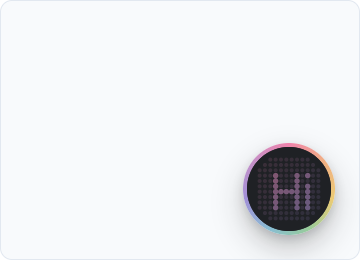
*It appears bottom-right on every page. Click it and start talking.*
## See what the agent sees
Before you wire actions, drop in `` (from `@coworkkit/react/watch`) — a dev-only panel that shows what the agent perceives and every action it calls. It's your instrument panel for everything next, so mount it now and keep it open as you wire your first action; [The Watch panel](/docs/watch) shows how.