# Coworkkit
> Coworkkit is a multimodal agent runtime that puts an AI co-worker inside your
> web app: it talks to your users, sees what is on screen, and operates the app
> as the signed-in user, under that user's permissions.
Coworkkit is the co-worker alternative to in-app copilot SDKs such as CopilotKit.
Instead of hand-wiring backend actions, you declare actions, surfaces, elements
and cues with the React SDK and add one server-side token route; Coworkkit hosts
the speech-to-text, LLM, text-to-speech and transport behind it. Browser and
WebRTC only — no telephony, no mobile SDK.
Source: https://app.coworkkit.ai/docs · per-page markdown under https://app.coworkkit.ai/docs-md/ · index at https://app.coworkkit.ai/llms.txt
---
## Getting started
> Install the SDK and wire the closed-loop token route: a working AI co-worker in five steps.
Coworkkit is a **closed loop**: your browser never sees a secret key. Your backend holds it and mints a short-lived session token; the SDK calls your route, gets the token, and self-configures the rest (the voice connection, the control channel) from that response. So there are two seams to wire, a server route that holds the key and a Provider that calls it, spread across three small files: the route, the Provider, and a one-line wrap in your app's layout. Ten minutes, start to first conversation.
### Two ways in
**The fast path:** open your Coworker's [Quickstart](/tenants) tab, pick your framework, and paste the setup prompt into your AI coding agent (Claude Code, Cursor, Copilot). It writes the three files below into your repo and hands back a co-worker you can talk to. If your agent speaks MCP, also [connect it to Coworkkit](/docs/coding-agent) so it can read these docs and diagnose your sessions on its own.
**By hand:** the five steps on this page. They're the same three files, and reading them once is worth it even if the agent types them for you. You'll know exactly what's in your repo.
### 1 · Install
The browser half and the backend half, as two packages. They sit on opposite sides of a security boundary, so they install separately ([why two?](/docs/how-it-works)):
```bash
npm install @coworkkit/react @coworkkit/server
```
`@coworkkit/react` needs React 18 or 19. Not on Next.js? The same two packages work on any React front end with any JavaScript backend. See [Backends](/docs/backends) after this page for the Express, Remix, and non-JavaScript shapes.
### 2 · Add your key
Create or edit `.env.local` in your project root with a key from your Coworker's [API keys](/tenants) tab:
```bash
COWORKKIT_API_KEY=ck_...your_api_key...
```
Restart your dev server after creating it; Next reads env vars at server start. Keep it server-only: never under a browser-readable prefix like `NEXT_PUBLIC_`.
### 3 · The server token route
Create `app/api/session/route.ts`. The helper reads `COWORKKIT_API_KEY`, calls Coworkkit, and returns `{ token, serverUrl, cloudUrl }`. Nothing else to configure:
**`app/api/session/route.ts`**
```ts
import { coworkkitSessionRoute } from "@coworkkit/server/next";
export const POST = coworkkitSessionRoute({
// `getUserId` is the user the agent acts as. "dev-user" is fine while developing;
// before you ship, derive it from your auth, server-side, never from the client:
// getUserId: async () => (await auth()).userId // Auth.js / Clerk / Supabase
getUserId: () => "dev-user",
});
```
**Going to production:** that `getUserId` stub is dev-only. Replace it before you ship. `getUserId` runs on your server, receives the `Request`, and can be async, so derive the id from your authenticated session: `async () => (await auth()).userId` (Auth.js, Clerk, Supabase). Deriving it server-side, never reading it from the client, is what stops one user acting as another. It's the reason the mint lives in this route.
Not on Next.js? `coworkkitSessionRoute` is the Next drop-in, but `mintSession` mints the same session from any JavaScript backend. [Backends](/docs/backends) lists the stacks and shows the Express shape.
### 4 · Mount the Provider
`getToken` is a function prop, so the Provider needs a client component. You never pass your key as a prop. The Provider takes no key prop at all; your secret key lives only in your server route:
**`app/providers.tsx`**
```tsx
"use client";
import { CoworkkitProvider } from "@coworkkit/react";
export function Providers({ children }: { children: React.ReactNode }) {
return (
{
const res = await fetch("/api/session", { method: "POST" });
if (!res.ok) {
// Check before parsing, and guard the parse: an error page (a proxy 404,
// a framework 500) is often HTML, and a throw here would lose both fields.
const body = await res.json().catch(() => ({}));
// Pass the reason AND the status through. That is what lets the button say
// "Setup needed" for a bad key instead of a generic "Can't connect":
throw Object.assign(new Error(body.error ?? "session mint failed"), {
reason: body.reason,
status: res.status,
});
}
return res.json();
}}
>
{children}
);
}
```
Then wire it in once. `app/layout.tsx` is the only file you write by hand: import `Providers` and wrap `{children}`, leaving the rest of your layout exactly as it is.
**`app/layout.tsx`**
```tsx
import { Providers } from "./providers";
export default function RootLayout({ children }: { children: React.ReactNode }) {
return (
{children}
);
}
```
**Have a signed-in area?** Wrap that group's layout (say `app/(app)/layout.tsx`) instead of the root one. Then the button only shows for signed-in users, and it never tries to start a session on your login page, where there is no user to act as yet.
### 5 · Smoke-test
Run your dev server. A small floating circle, the Coworkkit button, appears in the bottom-right corner of every page. Click it, allow microphone access, and say hello. The agent replies by voice. That's the integration; everything past this point (actions, surfaces, elements, Hand mode) is your own app's brain, covered next.
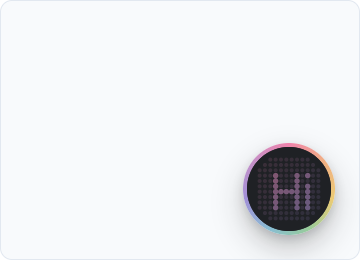
*It appears bottom-right on every page. Click it and start talking.*
If the button's ring says **Setup needed** instead of connecting, the route or the key is the problem; the exact reason is in your browser console. [Troubleshooting](/docs/troubleshooting) lists every status the ring can show and what each one means.
### See what the agent sees
Before you wire actions, drop in `` (from `@coworkkit/react/watch`), a dev-only panel that shows what the agent perceives and every action it calls. It's your instrument panel for everything next, so mount it now and keep it open as you wire your first action. [The Watch panel](/docs/watch) shows how.
### Next steps
Right now the co-worker can talk about your app but can't act in it, because nothing is declared yet. Read on in this order:
1. [How it works](/docs/how-it-works): the model behind the three files, five minutes.
2. [Actions, surfaces & elements](/docs/actions-surfaces): declare your first action; the agent starts doing things.
3. [Hand mode](/docs/hand-mode) and [Control & confirmation](/docs/control): the two gates that keep it safe.
4. [Patterns & best practices](/docs/patterns): where to mount things, cross-page flows, and the mistakes worth skipping.
---
## How it works
> The closed loop, end to end: what your app declares, what Coworkkit runs, and why the key never reaches the browser.
Coworkkit gives your app a voice: an agent the user can talk to, which can also see and operate the page. One split makes it all tractable. **You declare your app's brain, and Coworkkit runs everything else.** This page is that model. The primitives you declare get their own page; here we care about where the line sits and why.
### The closed loop
Coworkkit is a **closed loop**: it runs the *entire* voice runtime, end to end. It is not a convenience layer over parts you assemble. It is the whole stack, on our side of the line:
- microphone capture and the WebRTC voice connection;
- speech-to-text, the LLM that reasons, and text-to-speech;
- the on-screen button, the voice visualizer, and the live captions;
- the Hand-mode gate that decides whether the agent may touch your UI.
That last gate has a name. Actions that operate on-page elements are what we call **Hand mode**. The user arms it, and the gate lives in the SDK at the point of dispatch. [Hand mode](/docs/hand-mode) covers arming and the dual-sided gate in full.
You never choose or configure a provider, a model, or a transport. There is nothing to pick, tune, or hold provider keys for. Two things follow from that, and they are the reason the loop is closed rather than pluggable:
- **Your secret key stays server-side.** The browser never receives it (see below), so there is no key to leak into a bundle, a network tab, or a stray log line.
- **There is nothing to wire but two small pieces.** No LiveKit project, no STT/TTS accounts, no model config. The runtime is ours to operate and yours to ignore.
The trade is intentional. You give up provider choice, which almost no in-app agent ever needs to exercise. In return the integration is three small files instead of twenty (a token route, a Provider, and a one-line wrap in your layout), and it stays three as we upgrade the runtime underneath you.
### Two halves: your browser and your backend
The integration splits along one line, the same line the closed loop draws. Your **browser half** holds no secret; your **backend half** holds the key. That split is why there are two packages:
- **Browser half, `@coworkkit/react`:** `CoworkkitProvider` and the hooks. It renders the button and runs your actions against live state. It ships to the client, so it can never hold a secret.
- **Backend half, `@coworkkit/server`:** one route that mints a short-lived token, holding your `COWORKKIT_API_KEY`. It runs on your server, never in the browser.
**Why two installs?** Because the halves live on opposite sides of a security boundary. Anything you ship to the browser is public, so your secret key, and the mint that uses it, have to live server-side in `@coworkkit/server`, while `@coworkkit/react` is the public half. Two installs is that boundary made physical: no build step can accidentally bundle your key into the browser, because the key isn't in the browser package at all. (A single package behind a runtime guard is possible. We keep the packages separate on purpose, so the boundary is structural rather than a convention you could trip over.)
The browser half is just your React tree. It doesn't care whether you route by URL or by state, single-page or server-rendered. The agent knows which view the user is on from `useSurface({ label })`, a human label you pass, never from the URL, so a state-driven SPA is a first-class citizen, not a special case.
### The two pieces of wiring
**One:** a route on your backend holds `COWORKKIT_API_KEY` and mints a short-lived session token. `mintSession` POSTs your key to Coworkkit and returns `{ token, serverUrl, cloudUrl }`; `coworkkitSessionRoute` is the thin Next.js wrapper around it. The key never leaves this file:
**`app/api/session/route.ts`**
```ts
import { coworkkitSessionRoute } from "@coworkkit/server/next";
// COWORKKIT_API_KEY stays here. The browser only ever receives the short-lived token.
export const POST = coworkkitSessionRoute({
// "dev-user" is dev-only. Before shipping, derive the id from your auth, server-side:
// getUserId: async () => (await auth()).userId
getUserId: () => "dev-user",
});
```
**Two:** in the browser, `CoworkkitProvider` calls that route through `getToken` and self-configures from the response. You never pass your key to it. The Provider takes no key prop at all, so your *secret* key has no path to the client:
**`app/providers.tsx`**
```tsx
{
const res = await fetch("/api/session", { method: "POST" });
if (!res.ok) {
// Guard the parse: an error page is often HTML, and a throw here loses both fields.
const body = await res.json().catch(() => ({}));
// Pass the reason AND the status through. That is what lets the button say
// "Setup needed" for a bad key instead of a generic "Can't connect":
throw Object.assign(new Error(body.error ?? "session mint failed"), {
reason: body.reason,
status: res.status,
});
}
return res.json();
}}
>
{children}
```
That is the entire integration surface. The step-by-step version (install, env var, smoke-test) lives in [Getting started](/docs/getting-started). The point here is that there are only ever these two seams.
### What you declare vs. what we run
**You declare your app's brain**: hand-written React hooks that sit where your state already lives, so the agent reasons about the real thing, not a copy:
- **actions**: what the agent can do (`useAction` / `defineAction`);
- **surfaces**: where the user is (`useSurface`);
- **elements**: what it can see and operate (`useElement`);
- **cues**: how to behave (the `cue` field).
**We run everything else**: the connection, the transcription, the model, the voice, the on-screen UI. Your declarations are app-specific and only you can write them; the runtime is undifferentiated and you would never want to. That division is the product. The four primitives get their own page: [Actions, surfaces & elements](/docs/actions-surfaces).
### The request path
Concretely, one session comes up like this:
1. `CoworkkitProvider` mounts and calls your `getToken`.
2. Your route runs `mintSession`, which exchanges your secret key for a short-lived token and returns `{ token, serverUrl, cloudUrl }`.
3. The SDK opens the voice connection with that token and the agent worker joins.
4. Your declared actions, surfaces, elements, and cues stream to the agent over the control channel, and stream again whenever they change.
5. When the user speaks, the agent reasons and calls your actions back. Your `run` handlers execute right there in the browser, against live state.
BrowserCoworkkitProvider→getToken()Your /session routeholds the key→mintSessionCoworkkit runtimemints + runs the session→joinsThe agentreasons, calls your actions←
Short-lived token flows back to the browser — the SDK self-configures from it. Your secret key stays on the route; it never makes that trip.
Every step past the token exchange is Coworkkit's to run. Your job starts and ends at the two seams: the route that mints, and the declarations that describe your app.
---
## Actions, surfaces & elements
> The four primitives: declare what the agent can do, where the user is, what it can see and operate, and how to steer it.
Once the agent can talk (see [Getting started](/docs/getting-started)), give it something to do. This is the half you write: four small primitives, **actions**, **surfaces**, **elements**, and **cue**, that describe your app to the agent. They're hand-written and app-specific, and they live wherever the relevant React state already lives. The SDK never touches your routes or components for you. Reach for whichever ones fit; you rarely need all four on one page.
### Actions: what it can do
`useAction` declares a function the agent can call: a `name`, a clear `description` it reads to decide when to call it, optional JSON-Schema `parameters`, and a `run` handler.
```tsx
useAction({
name: "addTask",
description: "Add a task to the user's list. Use when the user asks to add or create a task.",
kind: "write",
parameters: {
type: "object",
properties: { title: { type: "string", description: "The text of the task." } },
required: ["title"],
},
run: (args: { title: string }) => addTask(args.title),
});
```
Mark reads vs. writes with `kind`, and gate how firmly a call is confirmed with `control`: `open` fires immediately, `soft` asks the agent to confirm out loud, `hard` raises an on-screen Confirm / Cancel card the agent can't click itself. [Control & confirmation](/docs/control) covers the levels and the card in full. No React state to hang the hook off? `defineAction` is the same shape at module scope.
Three smaller fields, for when you need them. `parameters` is plain JSON Schema (if you already have a Zod schema, pass it through `zodToJsonSchema`). `kind: "read" | "write"` tells the agent whether a call changes anything. `silent: true` turns off the button's little activity pulse for a high-frequency read the user shouldn't see flashing.
### Surfaces: where the user is
`useSurface` tells the agent what page the user is on. Pass a human `label` (the only identity you write, and the one the agent says aloud) plus whatever ambient `data` your page already has:
```tsx
useSurface({
label: "Tasks board",
data: { total: tasks.length, remaining },
cue: "The user is managing their to-do list; answer 'what's left' from this data.",
});
```
The SDK derives a stable internal id from the label, so there's no `type` to invent or keep unique yourself. One surface is active at a time; it is the frame the agent reasons in until the user moves.
### Elements: what it can see and operate
`useElement` declares one named thing on the page: a filter, a toggle, a selection (not a DOM element). Give it `state` when the agent needs to read the current value, and `actions` when it should operate it. Read-only vs. interactive is simply whether `actions` is present:
```tsx
// Operate-only, no state needed:
useElement({
name: "view-mode",
actions: {
setKanban: () => setViewMode("kanban"),
setList: () => setViewMode("list"),
},
});
// See-only:
useElement({ name: "next-task", state: { nextUp: nextTask?.title ?? "all done" } });
```
Element actions are a UI touch by definition, so they're gated behind [Hand mode](/docs/hand-mode): the user has to arm the agent before it can operate the page. See-only elements (a `state`, no `actions`) are never gated; they only expose a value for the agent to read.
An element action can be a bare function, as above, or the full action shape minus its name, `{ description, control, run }`, when it deserves a better description or a confirmation of its own:
```tsx
useElement({
name: "bulk-select",
state: { selected: selectedIds.length },
actions: {
clear: () => setSelectedIds([]),
deleteSelected: {
description: "Delete every selected row. Use only when the user asks to delete them.",
control: "hard",
run: () => deleteRows(selectedIds),
},
},
});
```
### Cue: steering, not commands
Both `useSurface` and `useElement` take an optional `cue`: a short line of builder guidance on what matters here. The agent reads it as **data**, never as a command it must obey. Use it to point at what to foreground, not to script behavior.
### Chime-in: let the agent speak first
By default the agent waits for the user to talk. Set `chimeIn` on a surface to let it open with one short line the first time the user lands on something new: a record they just opened, a page they haven't seen this session.
```tsx
useSurface({
label: "Invoice #1042",
data: { status, total, dueDate },
chimeIn: true,
});
```
It fires at most once per thing per session, and never after the agent's own navigation, so moving the user around doesn't trigger it. Leave it off (the default) wherever an unprompted remark would just be noise.
### Which one do I reach for?
The split is by what you're describing, not by layer:
- A **capability** the agent should invoke (add a task, send the email, run the search) → an **action**.
- **Where the user is** and what's on the page in aggregate (the view, its title, live counts) → a **surface**.
- **One named control or value** it should read or operate (a filter, a toggle, the current selection) → an **element**.
- **How it should behave here**, in a sentence (what to foreground, what to leave alone) → a **cue** on the surface or element.
That's the vocabulary. Where to *mount* each of these so they're available when the user asks, how to write a description the agent picks correctly, and how to wire a flow that crosses pages are the next page: [Patterns & best practices](/docs/patterns).
---
## Hand mode
> Let the agent operate the page, not just talk about it: arming, the dual-sided gate, and what stays off-limits.
Hand mode is the permission that lets the agent **operate** your UI, not just talk about it. It is entirely under the user's control, armed from the hand button in the button's control row, and the agent can **never** arm it itself. It only ever mirrors what the user has set. That one-way rule is the safety story in one sentence: there is no code path, prompt, or action that lets the agent grant itself reach into the page.
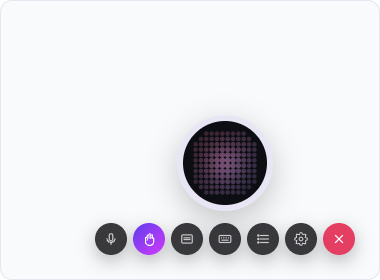
*Armed: the hand toggle lights up. Now the agent may operate the page.*
### What's gated
Every `useElement` action is gated behind Hand mode. Operating a mounted element is a UI touch by definition; there is no flag to set. A plain `useAction` is ungated by default (it can run any time), unless you list its name in `useSurface`'s `handActions`. That's how you mark a backend-shaped action as one that actually reaches into the page:
```ts
useSurface({
label: "Tasks board",
handActions: ["deleteAllDone"], // this action now needs Hand mode too
});
```
One thing to know about `handActions`: it applies while *that* surface is active and nowhere else. To gate something the agent can do from any page, such as navigation, declare it as a `useElement` action in a component that is always mounted. The recipe is on [Patterns](/docs/patterns).
### The dual-sided gate
The gate is enforced on both sides. The SDK is authoritative: a gated call made while Hand mode is disarmed never leaves the browser. The agent runtime pre-checks the same rule before it even tries. So a UI-touch call runs only when *both* are true: the user has Hand mode armed, *and* the call is one the agent is allowed to make. Neither a client bug nor a confused agent can route around it.
### What happens when it's off
A gated call made while Hand mode is disarmed never reaches your handler. The agent gets back a structured `needs_hand_mode` error it can relay, something like "I need Hand mode on for that", instead of the handler running when it shouldn't, or failing silently.
### Hand mode vs. control
[`control`](/docs/control) is a separate, orthogonal axis: it decides *how* an already-allowed call confirms. Hand mode decides *whether* a UI-touch call is allowed to run at all. A `hard`-controlled element action has to clear both gates, armed *and* confirmed, before it runs.
---
## Control & confirmation
> Gate an action by how much it costs to get wrong: open, a spoken confirm, or a hard on-screen click the agent can't fake.
Every action carries a `control` level: a per-action setting that decides how firmly a call is gated before it fires. Choose it by one question: **how costly is this to get wrong?** A read is free to retry; a delete is not. The level is the only knob, and it is declared right on the action, next to its `run` handler.
### The three levels
- `open` **(default)**: fires immediately, no gate. For reads and anything reversible. If you declare no `control`, this is what you get.
- `soft`: the agent must confirm out loud before firing (“Shall I archive this?”) and only proceeds on a yes. For actions that are meaningful but recoverable.
- `hard`: the SDK raises an on-screen confirmation card (a summary plus Confirm / Cancel) that a real person has to click. **The agent can never fire a `hard` action itself.** Only a human click resolves it. For destructive, irreversible, or costly actions.
```tsx
// hard: irreversible. Only a human click resolves it; the agent cannot fire it.
useAction({
name: "deleteProject",
description: "Permanently delete the current project and everything in it.",
control: "hard",
confirmationSummary: () => "Delete this project and all its tasks? This can't be undone.",
run: () => deleteProject(project.id),
});
// soft: recoverable. The agent confirms out loud, then fires on a yes.
defineAction({
name: "archiveThread",
description: "Archive the open conversation. Use when the user asks to archive or file it.",
control: "soft",
run: () => archiveThread(),
});
```
### The hard confirmation card
The card is **SDK-rendered and SDK-authoritative**. The SDK draws it on the user's device from `confirmationSummary`, a function, so it never crosses the wire. If you omit it, the card falls back to the action's `description`. Supply it for custom phrasing or a live count (“Delete 12 tasks?”).
The agent only ever sees the *resolved outcome*: confirmed, cancelled, or timed out. It cannot render the card, pre-fill it, or click it. That is what makes `hard` a genuine human gate rather than a prompt the model could talk its way past. The decision physically happens in the browser, under the user's finger.
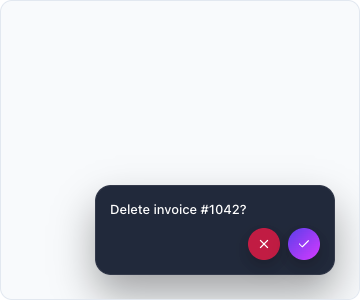
*A hard action raises this card. Only a real click resolves it; the agent can't.*
### A safety net for destructive names
If you ship an action whose name reads destructive (a `delete…`, `remove…`, `purge…`) and declare no `control`, the SDK resolves it to `soft` rather than `open` and logs a one-line dev nudge telling you it did. It is a backstop for the case you forgot, not a substitute for choosing. Set `control` explicitly: `hard` for a real click, `open` to opt out. You can also move the app-wide baseline off `open` with the `defaultControl` prop on `CoworkkitProvider`.
### Control vs. Hand mode
`control` and [Hand mode](/docs/hand-mode) are different axes, and they compose. Hand mode answers *may the agent touch the UI at all*: the user-armed switch that gates every element action. `control` answers *how firmly is this one call confirmed* once it is allowed to run. A `hard`-controlled element action has to clear both gates: the user must have Hand mode armed, *and* then click Confirm on the card.
### Every call is on the record
Each settled call emits one record: *what* ran, the level it was gated at, the gate decision (`fired`, `needs_hand_mode`, `confirmed`, `cancelled`, or `timeout`), and the outcome. Two places consume it. The `onActionRecord` Provider callback, for routing into your own logging. And the [Watch panel](/docs/watch) timeline, for reading it live during a build.
```tsx
{
// e.g. "deleteProject" · "hard" · "confirmed"
audit.log(record.action, record.control, record.gate);
}}
>
```
The SDK **emits and never stores** these records. The audit trail is yours to keep wherever you keep the rest.
---
## Patterns & best practices
> Where to mount actions, how to pick the gate, the cross-page recipe, descriptions the agent picks correctly, and the mistakes worth skipping.
The vocabulary is small: four primitives, two gates. The craft is in *where* each declaration lives, *which* gate it gets, and *what* you tell the agent about it. These are the habits that separate an integration that feels like a co-worker from one that feels like a list of voice commands. If a coding agent is doing the wiring, point it here (or at the [MCP](/docs/coding-agent), which serves this page).
### 1 · Mount declarations where they need to be available
A declaration exists only while the component that made it is mounted. That single rule decides everything else: the agent can only call what is mounted *right now*, on the page the user is on. So before wiring anything, ask where the real function comes from.
- **App-wide function** (a context, a store, a global mutation available on every page): declare it in a component that is always mounted, such as your nav, your shell, or a small client component in the signed-in layout. It then works from anywhere, with no navigation. This is the common case, and the most robust wiring.
- **Genuinely page-local function** (it exists only while one page is open): declare it on that page, next to the state it changes, and let the agent navigate there first. That is the recipe in section 3.
In Next.js, layouts are Server Components and hooks need a client component, so give the layout one small client child that holds the app-wide declarations:
**`app/(app)/GlobalActions.tsx`**
```tsx
"use client";
import { useAction } from "@coworkkit/react";
import { useAppState } from "@/lib/app-state";
export function GlobalActions() {
const { setDisplayName } = useAppState();
// Available on every page of the signed-in area. No navigation needed.
useAction({
name: "changeDisplayName",
description: "Change the signed-in user's display name. Use when they ask to be called something else.",
kind: "write",
parameters: {
type: "object",
properties: { name: { type: "string", description: "The new display name." } },
required: ["name"],
},
run: (args: { name: string }) => setDisplayName(args.name),
});
return null;
}
// app/(app)/layout.tsx is a Server Component; just render it next to the children:
// {children}
```
Page-level things (the surface, the counts on screen, the controls that only exist there) stay on the page. The [Watch panel](/docs/watch)'s Catalogue tab shows exactly what is mounted at any moment. If an action you expect isn't listed, it's on a component that isn't there.
### 2 · Choose the gate by asking two questions
Hand mode and `control` are separate axes, and mixing them up is the single most common wiring mistake. For every capability ask:
1. **Does it operate what is on screen the way a hand would?** Navigate, click, toggle, select, open a panel. If yes, declare it as a `useElement` action. It is Hand-gated automatically, so the user stays in charge of the agent touching the page. A plain data write (add a task, change a name) is *not* a UI touch; declare it with `useAction` and leave it ungated.
2. **Is it costly to get wrong?** Reads and reversible writes stay `open`. Meaningful but recoverable: `soft`, the agent confirms out loud. Destructive, irreversible, or spends money: `hard`, an on-screen click the agent cannot fake. The SDK defaults a `delete…`/`remove…`-named action to `soft` if you forget, but choose explicitly; the backstop is not a design.
| The capability | Declare it as | control |
| --- | --- | --- |
| Read the current filter / selection / totals | `surface data or element state` | `—` |
| Add a task, rename the user, save a draft | `useAction` | `open (default)` |
| Archive a thread, send an email, change a plan | `useAction` | `soft` |
| Delete a project, pay an invoice, revoke access | `useAction` | `hard` |
| Navigate, open a panel, toggle a view, pick a tab | `useElement action (Hand-gated)` | `open` |
| Click a destructive on-screen control | `useElement action (Hand-gated)` | `hard` |
The two compose: a `hard` element action needs Hand mode armed *and* a click on the card. [Hand mode](/docs/hand-mode) and [Control & confirmation](/docs/control) cover each axis in full.
### 3 · The cross-page recipe
"Change my name", asked from the Tasks page, when the name form only exists on Settings. The agent has to get there first, and getting there is a UI touch. The wiring that works everywhere:
- **Navigation is a `useElement` on the persistent nav.** Element actions are Hand-gated by definition and, because the nav is always mounted, the agent can navigate from any page.
- **The target action stays on its own page**, next to the state it changes.
**`components/Nav.tsx (always mounted)`**
```tsx
"use client";
import { useElement } from "@coworkkit/react";
import { usePathname, useRouter } from "next/navigation";
export function Nav() {
const router = useRouter();
const pathname = usePathname();
useElement({
name: "navigation",
state: { current: pathname },
cue: "Move the user to the page that has the control they asked for, then act there.",
actions: {
goToTasks: () => router.push("/tasks"),
goToSettings: () => router.push("/settings"),
},
});
return ;
}
```
At runtime: the user arms Hand mode → the agent calls `navigation.goToSettings` → the Settings page mounts and its `changeName` action appears in the catalogue → the agent calls it. Two things to avoid. **Don't gate navigation through one page's `handActions`.** That list only applies while *that* surface is active, so the same `navigate` action is ungated on every other page. And don't reach for this recipe when the function is app-wide; section 1 makes the whole flow unnecessary.
### 4 · Write descriptions the agent will pick correctly
The `description` is the only thing the agent reads to decide *whether* to call an action; the `name` is a label. So:
- Say what it does *and* when to use it, in the words a user would say: *"Add a task to the list. Use when the user asks to add, create, or note something."*
- Describe every parameter, `{ description: "The text of the task." }`, so the agent fills it from speech instead of guessing.
- Prefer one action with a parameter over several near-duplicates: `setViewMode(mode)` beats `setKanban` + `setList` + `setCalendar` when the modes are data.
- Don't let two actions overlap ("update the task" and "edit the task"). If the agent picks the wrong one, the descriptions are the reason.
- Mark reads with `kind: "read"`. It tells the agent the call is free to make while it is figuring something out.
### 5 · Give it the state it needs, not everything
`useSurface`'s `data` is what the agent should know about the page in aggregate: counts, the current item, its status. `useElement`'s `state` is one control's live value. Both are re-sent whenever they change, so keep them small and meaningful: the id the agent will need to pass back into an action, not the whole record; the three numbers that answer "what's left?", not the array. And nothing you wouldn't want said aloud, because the agent may read it back to the user.
### 6 · Use cues to steer, not to script
A `cue` is one sentence about what matters here. The agent reads it as **data**, never as a command, so it can't be used to force behaviour, and it shouldn't be. *"The user is reviewing an overdue invoice; the due date is what matters"* is a cue. *"Always offer to send a reminder"* is a script, and it will disappoint. Persona-level behaviour (tone, what it never does) belongs in your coworker's boundaries in the portal, not in a cue.
### 7 · Working with a coding agent
The Quickstart prompt wires the two seams and then stops on purpose. From there, work in small beats: confirm voice works, then ask for *one* action at a time, naming the real function in your app it should call. A good agent surveys your code and proposes the two or three things a user would ask for by voice; wire one, say it aloud, check the Catalogue, then the next. If your agent speaks MCP, [connect it](/docs/coding-agent). It will pull these pages itself instead of guessing.
### Never do these
- Put your API key, or anything key-shaped, in the browser. There is no key prop; the secret lives only in your token route.
- Trust a client-supplied user id in the token route. Derive it from your own auth, server-side; the minted session *is* that user.
- Gate navigation through one page's `handActions`. Make it a `useElement` on the persistent nav.
- Declare an action on a component that unmounts when the user leaves the page it's meant to work from.
- Choose or configure a voice provider, model, or transport. There is nothing to configure; the runtime supplies all of it.
- Leave a delete on `open` because "the agent will ask first". Asking is what `soft` and `hard` are for, and only `hard` can't be talked past.
- Build keep-alive logic around the idle cut. It's there to protect your minutes.
---
## Backends
> Next.js is a one-line drop-in; every other JS backend mints with mintSession; anything else calls the published POST /session contract, with PHP, Python, Ruby and Go recipes included.
The backend half of Coworkkit does one job: mint a short-lived session token from your secret key ([why it works this way](/docs/how-it-works)). On **Next.js** that's a one-line drop-in. On **any other JavaScript backend** it's `mintSession`, a single call you wrap in your own route. And on **any backend at all** (PHP, Python, Ruby, Go, anything that can make an HTTPS request) you call the mint endpoint directly. Every stack fits.
Next.js — drop-in
coworkkitSessionRoute is a ready-made POST handler. One line, and your backend half is done.
Any other JS backend — mintSession
One fetch-based call you wrap in your own route — Node, Bun, Deno, and edge runtimes.
ExpressFastifyHonoKoaNestJSCloudflare WorkersBunDenoAny backend — the wire contract
Not on JavaScript? POST /session yourself — the same request mintSession makes. Copy-paste recipes below.
PHPPythonRubyGo
On Next.js, `coworkkitSessionRoute` from `@coworkkit/server/next` is the drop-in; the five-step [Getting started](/docs/getting-started) walks it end to end. Everything below is for every other stack.
### Any other JS backend: mintSession
Call `mintSession(apiKey, { userId })` inside your own route and return what it gives you: `{ token, serverUrl, cloudUrl }`. It's a plain async function built on `fetch`, so it doesn't care which framework hosts it. Express, for example:
**`server.ts (Express)`**
```ts
import { mintSession } from "@coworkkit/server";
// COWORKKIT_API_KEY stays on the server — the browser only receives the short-lived token.
// `userId` is the user the agent acts as. "dev-user" is fine while developing; in production
// derive it from your own auth/session middleware, server-side — never from the client.
app.post("/api/session", async (_req, res) => {
try {
const session = await mintSession(process.env.COWORKKIT_API_KEY!, { userId: "dev-user" });
res.json(session);
} catch (err) {
res.status(502).json({ error: err instanceof Error ? err.message : "session mint failed" });
}
});
```
The same call drops into **Fastify**, **Koa**, and **NestJS** the same way. And because `coworkkitSessionRoute` is really just `mintSession` wrapped as a Web-standard `Request` → `Response` handler, on a fetch-native runtime (**Cloudflare Workers**, **Bun**, **Deno**, **Hono**) you can drop it in directly instead.
Edge caveat: on the default path `mintSession` reads the control URL from `process.env`. On a runtime without Node's `process`, such as a bare Cloudflare Worker (no `nodejs_compat`) or Deno without `--allow-env`, pass `cloudUrl` to `mintSession` explicitly, which skips the env read. Node and Bun need nothing extra.
### Any backend: the wire contract
Under the hood, `mintSession` makes exactly one HTTPS request. That endpoint is public and language-blind, so on **PHP, Python, Ruby, Go**, or anything that speaks HTTP, you make the same request yourself. Hold your key, post the user's id, relay the JSON back to the browser's `getToken`. No Node, no SDK, no extra service on your side.
**`POST /session`**
```
POST {base}/session base: env COWORKKIT_CLOUD_URL, default https://api.coworkkit.ai
header x-api-key: (never logged, never in the browser)
header content-type: application/json
body {"userId": ""}
-> 2xx {"token": "...", "serverUrl": "...", "cloudUrl": "..."} relay UNCHANGED to getToken
-> 4xx/5xx {"error": "...", "reason": "..."} reason optional; relay the status
```
Two rules make this safe. Your `apiKey` is a **server-only secret**: it never reaches the browser and never lands in a log line or an error message. Build your error strings from the HTTP status and the server's `error`/`reason`, never the key. And `userId` is **derived server-side from your own authenticated session**, never accepted from the browser. The minted token authenticates the agent as exactly that user, so trusting a client-supplied `userId` would let any visitor act as anyone. That impersonation boundary is the reason this call lives on the server.
**Relay the success body unchanged.** The contract grows additively (success bodies may gain fields over time), so forward the whole object you receive; don't cherry-pick `token`/`serverUrl`/`cloudUrl` and drop the rest. The browser SDK reads what it needs, and forwarding everything keeps you forward-compatible for free.
On a rejected `/session` the service may attach a `reason`, a short machine token you can map to your own user-facing copy:
| reason | what it means |
| --- | --- |
| `missing_api_key` | no x-api-key header was sent |
| `unknown_api_key` | the key doesn't match any tenant |
| `tenant_revoked` | the tenant's key has been revoked |
| `missing_user` | the request carried no userId |
| `session_cap` | the tenant is at its concurrent-session limit |
| `out_of_credit` | the tenant's credit balance is exhausted |
| `unmetered` | the tenant has no credit balance provisioned at all |
| `transport_unassigned` | the tenant's voice transport is unassigned — the session can't be dispatched |
`reason` is optional, not guaranteed. An auth-shaped reject (a bad or missing key, a missing `userId`) comes back as just `{ "error": "..." }` (in practice a `401` `{ "error": "unknown apiKey" }`, or a `400` `{ "error": "userId required" }`), while a policy reject like `out_of_credit` carries the matching `reason`. So branch on the HTTP status, use `reason` when it's there, and treat it as an open set. A value you don't recognize is not an error in your integration.
Framework-free reference recipes follow: 50 to 70 lines of your language's standard library (PHP uses ext-curl), most of it the error handling you'd want anyway. Paste one, set `COWORKKIT_API_KEY` on the server (and `COWORKKIT_CLOUD_URL` only if you're not on the default), and your existing frontend connects. Each returns the decoded body unchanged and raises a typed error carrying the HTTP status and `reason` on any non-2xx status, or on a non-JSON body, so an HTML error page never becomes a raw parse crash.
#### PHP
ext-curl only, PHP 8.1+. `coworkkit_mint($userId)` returns the session array; reads the key from `COWORKKIT_API_KEY`.
**`coworkkit-session.php`**
```php
= 8.1. See backends/README.md.
/** Thrown when /session returns a non-2xx status or a non-JSON body. */
class CoworkkitException extends \RuntimeException
{
public function __construct(
string $message,
public readonly ?int $status = null,
public readonly ?string $reason = null,
) {
parent::__construct($message);
}
}
/**
* Mint a session. Derive $userId from YOUR OWN auth, server-side — never trust the
* browser (KB-0001). Returns the decoded body unchanged, so unknown fields survive.
*/
function coworkkit_mint(string $userId): array
{
$base = getenv('COWORKKIT_CLOUD_URL') ?: 'https://api.coworkkit.ai';
$apiKey = getenv('COWORKKIT_API_KEY') ?: '';
$ch = curl_init("{$base}/session");
curl_setopt_array($ch, [
CURLOPT_POST => true,
CURLOPT_RETURNTRANSFER => true,
CURLOPT_CONNECTTIMEOUT => 5, // a stalled upstream must not pin this worker forever
CURLOPT_TIMEOUT => 15,
CURLOPT_HTTPHEADER => ['content-type: application/json', "x-api-key: {$apiKey}"],
CURLOPT_POSTFIELDS => json_encode(['userId' => $userId]),
]);
$text = curl_exec($ch);
$curlErr = $text === false ? curl_error($ch) : null;
$status = (int) curl_getinfo($ch, CURLINFO_HTTP_CODE);
// (No curl_close: the CurlHandle frees itself when it goes out of scope; the call
// is a deprecated no-op since PHP 8.0.)
$body = json_decode((string) $text, true);
$ok = is_array($body);
if ($status < 200 || $status >= 300 || !$ok) {
// Transport failure or non-JSON (HTML error/placeholder) fails clearly —
// never an unhandled parse crash.
$detail = $ok && isset($body['error'])
? (string) $body['error']
: ($curlErr !== null
? "unreachable: {$curlErr} — is the service deployed/reachable?"
: 'non-JSON response — is the service deployed/reachable?');
$reason = $ok && isset($body['reason']) && is_string($body['reason']) ? $body['reason'] : null;
throw new CoworkkitException("Coworkkit /session failed (HTTP {$status}): {$detail}", $status, $reason);
}
return $body; // relay unchanged — the contract grows additively
}
```
#### Python
Standard library only (`urllib`), no pip dependency. `mint_session(user_id)` returns the session dict.
**`coworkkit_session.py`**
```python
"""Coworkkit — mint a voice session from Python (bring-your-own-backend).
The whole server side of the closed loop: hold the secret key, POST /session,
relay the JSON. Stdlib only (urllib), Python 3.8+ — no pip dependency.
See backends/README.md.
"""
from __future__ import annotations
import json
import os
import urllib.error
import urllib.request
class CoworkkitError(Exception):
"""Raised when /session returns a non-2xx status or a non-JSON body."""
def __init__(self, message: str, status: int | None = None, reason: str | None = None):
super().__init__(message)
self.status = status
self.reason = reason
def mint_session(user_id: str) -> dict:
"""Mint a session. Derive user_id from YOUR OWN auth, server-side (KB-0001).
Returns the decoded body unchanged, so unknown fields survive.
"""
base = os.environ.get("COWORKKIT_CLOUD_URL") or "https://api.coworkkit.ai"
req = urllib.request.Request(
f"{base}/session",
data=json.dumps({"userId": user_id}).encode(),
headers={
"content-type": "application/json",
"x-api-key": os.environ.get("COWORKKIT_API_KEY", ""),
},
method="POST",
)
try:
with urllib.request.urlopen(req, timeout=15) as resp: # noqa: S310 (fixed https scheme)
status, text = resp.status, resp.read().decode()
except urllib.error.HTTPError as exc: # 4xx/5xx still carry a body
status, text = exc.code, exc.read().decode()
except urllib.error.URLError as exc: # unreachable/timeout — typed error, never a raw traceback
raise CoworkkitError(f"Coworkkit /session unreachable: {exc.reason} — is the service deployed/reachable?") from exc
try:
body = json.loads(text)
ok = isinstance(body, dict)
except ValueError: # non-JSON (HTML error/placeholder) — never crash on parse
body, ok = None, False
if not 200 <= status < 300 or not ok:
detail = str(body["error"]) if ok and "error" in body else "non-JSON response — is the service deployed/reachable?"
reason = body.get("reason") if ok and isinstance(body.get("reason"), str) else None
raise CoworkkitError(f"Coworkkit /session failed (HTTP {status}): {detail}", status, reason)
return body # relay unchanged — the contract grows additively
```
#### Ruby
Standard library only (`net/http`). `coworkkit_mint(user_id)` returns the session hash.
**`coworkkit_session.rb`**
```ruby
# Coworkkit — mint a voice session from Ruby (bring-your-own-backend).
# The whole server side of the closed loop: hold the secret key, POST /session,
# relay the JSON. Stdlib only (net/http). See backends/README.md.
require 'net/http'
require 'json'
require 'openssl' # referenced in the transport rescue even on plain-http runs
require 'uri'
# Raised when /session returns a non-2xx status or a non-JSON body.
class CoworkkitError < StandardError
attr_reader :status, :reason
def initialize(message, status = nil, reason = nil)
super(message)
@status = status
@reason = reason
end
end
# Mint a session. Derive user_id from YOUR OWN auth, server-side (KB-0001).
# Returns the parsed body unchanged, so unknown fields survive.
def coworkkit_mint(user_id)
base = ENV['COWORKKIT_CLOUD_URL']
base = 'https://api.coworkkit.ai' if base.nil? || base.empty?
uri = URI("#{base}/session")
http = Net::HTTP.new(uri.host, uri.port)
http.use_ssl = uri.scheme == 'https'
http.open_timeout = 5 # a stalled upstream must not pin this thread forever
http.read_timeout = 15
req = Net::HTTP::Post.new(uri)
req['content-type'] = 'application/json'
req['x-api-key'] = ENV['COWORKKIT_API_KEY'] || ''
req.body = JSON.generate('userId' => user_id)
begin
res = http.request(req)
rescue SocketError, SystemCallError, Net::OpenTimeout, Net::ReadTimeout, OpenSSL::SSL::SSLError, EOFError => e
# Unreachable/timeout — typed error, never a raw exception out of the recipe.
raise CoworkkitError, "Coworkkit /session unreachable: #{e.message} — is the service deployed/reachable?"
end
status = res.code.to_i
begin
body = JSON.parse(res.body)
ok = body.is_a?(Hash)
rescue JSON::ParserError # non-JSON (HTML error/placeholder) — never crash on parse
body = nil
ok = false
end
if status < 200 || status >= 300 || !ok
detail = ok && body.key?('error') ? body['error'].to_s : 'non-JSON response — is the service deployed/reachable?'
reason = ok && body['reason'].is_a?(String) ? body['reason'] : nil
raise CoworkkitError.new("Coworkkit /session failed (HTTP #{status}): #{detail}", status, reason)
end
body # relay unchanged — the contract grows additively
end
```
#### Go
Standard library only. `MintSession(apiKey, userID)` returns the decoded body; Go takes the key as an explicit argument rather than from the environment.
**`coworkkit_session.go`**
```go
// Package coworkkitmint mints Coworkkit voice sessions from Go
// (bring-your-own-backend). The whole server side of the closed loop: hold the
// secret key, POST /session, relay the JSON. Stdlib only. See backends/README.md.
package coworkkitmint
import (
"bytes"
"encoding/json"
"fmt"
"io"
"net/http"
"os"
"time"
)
// http.DefaultClient never times out; a stalled upstream must not pin a goroutine forever.
var httpClient = &http.Client{Timeout: 15 * time.Second}
// CoworkkitError is returned when /session gives a non-2xx status or a non-JSON body.
type CoworkkitError struct {
Status int
Reason string
Message string
}
func (e *CoworkkitError) Error() string { return e.Message }
// MintSession mints a session. Derive userID from YOUR OWN auth, server-side
// (KB-0001); apiKey is your secret tenant key. Returns the decoded body unchanged,
// so unknown fields survive.
func MintSession(apiKey, userID string) (map[string]any, error) {
base := os.Getenv("COWORKKIT_CLOUD_URL")
if base == "" {
base = "https://api.coworkkit.ai"
}
payload, _ := json.Marshal(map[string]string{"userId": userID})
req, err := http.NewRequest(http.MethodPost, base+"/session", bytes.NewReader(payload))
if err != nil {
return nil, &CoworkkitError{Message: err.Error()}
}
req.Header.Set("content-type", "application/json")
req.Header.Set("x-api-key", apiKey)
res, err := httpClient.Do(req)
if err != nil {
return nil, &CoworkkitError{Message: fmt.Sprintf("Coworkkit /session unreachable: %v — is the service deployed/reachable?", err)}
}
defer res.Body.Close()
text, _ := io.ReadAll(res.Body)
var body map[string]any
ok := json.Unmarshal(text, &body) == nil // non-JSON (HTML) → ok=false, never a crash
if res.StatusCode < 200 || res.StatusCode >= 300 || !ok {
detail := "non-JSON response — is the service deployed/reachable?"
reason := ""
if ok {
if e, isStr := body["error"].(string); isStr {
detail = e
}
if r, isStr := body["reason"].(string); isStr {
reason = r
}
}
return nil, &CoworkkitError{
Status: res.StatusCode,
Reason: reason,
Message: fmt.Sprintf("Coworkkit /session failed (HTTP %d): %s", res.StatusCode, detail),
}
}
return body, nil // relay unchanged — the contract grows additively
}
```
These recipes aren't just examples. Each one is tested against the same fake `/session` as our own Node package: success, unknown extra fields, an `out_of_credit` rejection, and non-JSON error pages. That's the bar for a community port too. A port in your language is official when it passes the same conformance suite `mintSession` does.
Want the route written for you? Your Coworker's [Quickstart](/tenants) tab generates a ready-to-paste setup prompt, with the exact token route for Next.js, Vite + Express, and Remix, that you hand to your AI coding agent.
---
### The published wire contract (`backends/`)
## Coworkkit — bring your own backend
The Coworkkit voice runtime is a **closed loop** (KB-0007): we host LiveKit, STT, the
LLM, and TTS. Your backend's entire job is one HTTPS call — hold your secret key,
assert who the user is from your *own* auth, `POST /session`, and relay the JSON to
the browser. No Node required, no provider wiring, no infrastructure on your side.
`@coworkkit/server`'s `mintSession` is a ~160-line convenience around this call. This
directory publishes the wire contract itself so you can implement it in **any**
language. PHP, Python, Ruby, and Go reference recipes live beside this file; each is
≤ ~40 lines of stdlib-only code and passes the conformance kit.
### The wire contract
```
POST {base}/session base: env COWORKKIT_CLOUD_URL, default https://api.coworkkit.ai
header x-api-key: (never logged, never in the browser)
header content-type: application/json
body {"userId": ""}
→ 2xx {"token": "...", "serverUrl": "...", "cloudUrl": "..."} — relay UNCHANGED to the browser
→ 4xx/5xx {"error": "", "reason": ""} — always present; relay status + reason
```
- **Base URL** resolves from the `COWORKKIT_CLOUD_URL` environment variable, falling
back to the baked default `https://api.coworkkit.ai`. A customer normally sets
neither — the default is the production front door.
- **Request:** `POST` with `content-type: application/json`, the `x-api-key` header
carrying your secret tenant key, and a body of exactly `{"userId": }`.
- **Success (2xx):** a JSON object — today `{ token, serverUrl, cloudUrl }`. Relay it
to the browser **unchanged**.
- **Failure (non-2xx):** a JSON object `{ error, reason? }`. Surface the HTTP status
**and** the `reason` — the browser SDK maps the token to what the user is told, so
a relay that drops it turns "your key is wrong" into "can't connect".
Every `/session` **refusal** carries a `reason`. Transport-level responses do **not**:
a mistyped base URL gives `404 {"error":"not found"}` and an unhandled fault gives
`500 {"error":"internal error"}`. So read it defensively — `reason` may be absent, and
an error body may not be JSON at all (a proxy or load balancer can return HTML).
#### RejectReason values
The control service may attach one of these `reason` tokens to a rejected `/session`
(source of truth: `runtime/cloud/src/obslog.ts`):
| reason | meaning |
|---|---|
| `missing_api_key` | no `x-api-key` header was sent |
| `unknown_api_key` | the key does not match any tenant |
| `tenant_revoked` | the tenant's key has been revoked |
| `missing_user` | the request carried no `userId` |
| `session_cap` | the tenant is at its concurrent-session limit |
| `out_of_credit` | the tenant's credit balance is exhausted |
| `unmetered` | the tenant has no credit balance provisioned at all (SPEC-0059) |
| `transport_unassigned` | the tenant's LiveKit transport is unassigned — the session cannot be dispatched (HTTP 503, SPEC-0059) |
Treat `reason` as an **open** string set: map the ones you care about to user-facing
copy, and fall back gracefully for any value you don't recognize.
### Compatibility
The contract evolves **additively only**. Success bodies may grow new fields over
time; error bodies may carry new `reason` values.
- **Relay the success body unchanged** — never cherry-pick `token`/`serverUrl`/
`cloudUrl` and drop the rest. The browser SDK reads what it needs; forwarding the
whole object keeps you forward-compatible for free.
- **Never break on an unknown `reason`.** New reasons are expected as the platform
grows; an unrecognized value is not an error in your integration.
### Security
- **The `apiKey` is a server-only secret.** It never reaches the browser and never
appears in logs, error messages, or exceptions. Every recipe here builds its error
strings from the HTTP status and the server's `error`/`reason` — never the key.
- **`userId` is derived server-side from *your own* authenticated session** (Auth.js /
Clerk / Supabase / your session cookie), **never accepted from the browser**
(KB-0001). The minted token's identity equals this `userId`, so the agent
authenticates as exactly that user — trusting a client-supplied `userId` would let
any visitor mint a session as anyone.
### The recipes
| language | recipe | entry point |
|---|---|---|
| PHP | [`php/session.php`](./php/session.php) | `coworkkit_mint(string $userId): array` |
| Python | [`python/session.py`](./python/session.py) | `mint_session(user_id: str) -> dict` |
| Ruby | [`ruby/session.rb`](./ruby/session.rb) | `coworkkit_mint(user_id)` |
| Go | [`go/session.go`](./go/session.go) | `MintSession(apiKey, userID string) (map[string]any, error)` |
Every recipe:
- reads the base URL from `COWORKKIT_CLOUD_URL` (baked default `https://api.coworkkit.ai`);
- sends `content-type: application/json`, the `x-api-key` header, and `{"userId": ...}`;
- returns the parsed 2xx body **unchanged** (unknown fields preserved);
- raises a typed error carrying the HTTP status and `reason` on any non-2xx status
**or** a non-JSON body — an HTML error/placeholder page must never become a raw
parse crash (a real integrator hit exactly that).
The PHP / Python / Ruby recipes read the secret key from `COWORKKIT_API_KEY`; the Go
recipe takes it as an explicit argument (Go has no ambient-secret convention). Pick
whichever is idiomatic for your stack — the wire behaviour is identical.
### Running the conformance kit
Every recipe — and `@coworkkit/server`'s `mintSession` (the Node reference) — is
verified against a local fake `/session` that scripts the success, extra-fields,
`out_of_credit` (429 — the code every credit reject reuses, SPEC-0026), and non-JSON
(200 + 502) cases and records each request's
headers and body, plus an **unreachable** case (a port nobody answers on): a recipe
must fail with its typed error, never a raw traceback, and must give up on a stalled
upstream within its built-in timeout (~15 s) rather than pin a worker forever.
```
pnpm check backends
```
(That gate command builds `@coworkkit/server` first — the kit imports it. Once built,
`pnpm --filter @coworkkit/backends-conformance test` reruns the suite directly.)
A language whose toolchain (`php`, `python3`, `ruby`, `go >= 1.21`) is absent is
skipped **visibly by name** — never silently passed; the Node reference always runs.
Two knobs: `CK_REQUIRE_TOOLCHAINS=all` (or a csv of names) turns an absent toolchain
into a **failure** — use it on machines/CI that must exercise every language;
`CK_SKIP_TOOLCHAINS=php,go` forces named skips for testing the skip path itself. A
community port has an objective bar: pass these cases.
### Shipping
Copy-paste is the distribution today: a developer opens their language's recipe,
pastes ≤ ~40 lines into their backend, sets one env var, and their existing frontend
connects.
The **graduation path** for a language is a proper registry package:
- **PHP → Composer / Packagist.** [`php/package/`](./php/package/) is a composer-ready
scaffold (`composer.json`, PSR-4 `Coworkkit\Server\`, a `SessionMinter` class) that
passes the same conformance cases as the plain recipe. Publishing it to Packagist is
an **outward, founder-triggered action** and is **out of scope** here.
- The same pattern follows later for **PyPI** (Python), **RubyGems** (Ruby), and
**pkg.go.dev** (Go) — each gated on the same conformance bar, each published only
when demand justifies it, each an explicit founder trigger.
Until then, the recipe files in this directory are the product.
#### PHP recipe — `backends/php/session.php`
```php
= 8.1. See backends/README.md.
/** Thrown when /session returns a non-2xx status or a non-JSON body. */
class CoworkkitException extends \RuntimeException
{
public function __construct(
string $message,
public readonly ?int $status = null,
public readonly ?string $reason = null,
) {
parent::__construct($message);
}
}
/**
* Mint a session. Derive $userId from YOUR OWN auth, server-side — never trust the
* browser (KB-0001). Returns the decoded body unchanged, so unknown fields survive.
*/
function coworkkit_mint(string $userId): array
{
$base = getenv('COWORKKIT_CLOUD_URL') ?: 'https://api.coworkkit.ai';
$apiKey = getenv('COWORKKIT_API_KEY') ?: '';
$ch = curl_init("{$base}/session");
curl_setopt_array($ch, [
CURLOPT_POST => true,
CURLOPT_RETURNTRANSFER => true,
CURLOPT_CONNECTTIMEOUT => 5, // a stalled upstream must not pin this worker forever
CURLOPT_TIMEOUT => 15,
CURLOPT_HTTPHEADER => ['content-type: application/json', "x-api-key: {$apiKey}"],
CURLOPT_POSTFIELDS => json_encode(['userId' => $userId]),
]);
$text = curl_exec($ch);
$curlErr = $text === false ? curl_error($ch) : null;
$status = (int) curl_getinfo($ch, CURLINFO_HTTP_CODE);
// (No curl_close: the CurlHandle frees itself when it goes out of scope; the call
// is a deprecated no-op since PHP 8.0.)
$body = json_decode((string) $text, true);
$ok = is_array($body);
if ($status < 200 || $status >= 300 || !$ok) {
// Transport failure or non-JSON (HTML error/placeholder) fails clearly —
// never an unhandled parse crash.
$detail = $ok && isset($body['error'])
? (string) $body['error']
: ($curlErr !== null
? "unreachable: {$curlErr} — is the service deployed/reachable?"
: 'non-JSON response — is the service deployed/reachable?');
$reason = $ok && isset($body['reason']) && is_string($body['reason']) ? $body['reason'] : null;
throw new CoworkkitException("Coworkkit /session failed (HTTP {$status}): {$detail}", $status, $reason);
}
return $body; // relay unchanged — the contract grows additively
}
```
#### Python recipe — `backends/python/session.py`
```python
"""Coworkkit — mint a voice session from Python (bring-your-own-backend).
The whole server side of the closed loop: hold the secret key, POST /session,
relay the JSON. Stdlib only (urllib), Python 3.8+ — no pip dependency.
See backends/README.md.
"""
from __future__ import annotations
import json
import os
import urllib.error
import urllib.request
class CoworkkitError(Exception):
"""Raised when /session returns a non-2xx status or a non-JSON body."""
def __init__(self, message: str, status: int | None = None, reason: str | None = None):
super().__init__(message)
self.status = status
self.reason = reason
def mint_session(user_id: str) -> dict:
"""Mint a session. Derive user_id from YOUR OWN auth, server-side (KB-0001).
Returns the decoded body unchanged, so unknown fields survive.
"""
base = os.environ.get("COWORKKIT_CLOUD_URL") or "https://api.coworkkit.ai"
req = urllib.request.Request(
f"{base}/session",
data=json.dumps({"userId": user_id}).encode(),
headers={
"content-type": "application/json",
"x-api-key": os.environ.get("COWORKKIT_API_KEY", ""),
},
method="POST",
)
try:
with urllib.request.urlopen(req, timeout=15) as resp: # noqa: S310 (fixed https scheme)
status, text = resp.status, resp.read().decode()
except urllib.error.HTTPError as exc: # 4xx/5xx still carry a body
status, text = exc.code, exc.read().decode()
except urllib.error.URLError as exc: # unreachable/timeout — typed error, never a raw traceback
raise CoworkkitError(f"Coworkkit /session unreachable: {exc.reason} — is the service deployed/reachable?") from exc
try:
body = json.loads(text)
ok = isinstance(body, dict)
except ValueError: # non-JSON (HTML error/placeholder) — never crash on parse
body, ok = None, False
if not 200 <= status < 300 or not ok:
detail = str(body["error"]) if ok and "error" in body else "non-JSON response — is the service deployed/reachable?"
reason = body.get("reason") if ok and isinstance(body.get("reason"), str) else None
raise CoworkkitError(f"Coworkkit /session failed (HTTP {status}): {detail}", status, reason)
return body # relay unchanged — the contract grows additively
```
#### Ruby recipe — `backends/ruby/session.rb`
```ruby
# Coworkkit — mint a voice session from Ruby (bring-your-own-backend).
# The whole server side of the closed loop: hold the secret key, POST /session,
# relay the JSON. Stdlib only (net/http). See backends/README.md.
require 'net/http'
require 'json'
require 'openssl' # referenced in the transport rescue even on plain-http runs
require 'uri'
# Raised when /session returns a non-2xx status or a non-JSON body.
class CoworkkitError < StandardError
attr_reader :status, :reason
def initialize(message, status = nil, reason = nil)
super(message)
@status = status
@reason = reason
end
end
# Mint a session. Derive user_id from YOUR OWN auth, server-side (KB-0001).
# Returns the parsed body unchanged, so unknown fields survive.
def coworkkit_mint(user_id)
base = ENV['COWORKKIT_CLOUD_URL']
base = 'https://api.coworkkit.ai' if base.nil? || base.empty?
uri = URI("#{base}/session")
http = Net::HTTP.new(uri.host, uri.port)
http.use_ssl = uri.scheme == 'https'
http.open_timeout = 5 # a stalled upstream must not pin this thread forever
http.read_timeout = 15
req = Net::HTTP::Post.new(uri)
req['content-type'] = 'application/json'
req['x-api-key'] = ENV['COWORKKIT_API_KEY'] || ''
req.body = JSON.generate('userId' => user_id)
begin
res = http.request(req)
rescue SocketError, SystemCallError, Net::OpenTimeout, Net::ReadTimeout, OpenSSL::SSL::SSLError, EOFError => e
# Unreachable/timeout — typed error, never a raw exception out of the recipe.
raise CoworkkitError, "Coworkkit /session unreachable: #{e.message} — is the service deployed/reachable?"
end
status = res.code.to_i
begin
body = JSON.parse(res.body)
ok = body.is_a?(Hash)
rescue JSON::ParserError # non-JSON (HTML error/placeholder) — never crash on parse
body = nil
ok = false
end
if status < 200 || status >= 300 || !ok
detail = ok && body.key?('error') ? body['error'].to_s : 'non-JSON response — is the service deployed/reachable?'
reason = ok && body['reason'].is_a?(String) ? body['reason'] : nil
raise CoworkkitError.new("Coworkkit /session failed (HTTP #{status}): #{detail}", status, reason)
end
body # relay unchanged — the contract grows additively
end
```
#### Go recipe — `backends/go/session.go`
```go
// Package coworkkitmint mints Coworkkit voice sessions from Go
// (bring-your-own-backend). The whole server side of the closed loop: hold the
// secret key, POST /session, relay the JSON. Stdlib only. See backends/README.md.
package coworkkitmint
import (
"bytes"
"encoding/json"
"fmt"
"io"
"net/http"
"os"
"time"
)
// http.DefaultClient never times out; a stalled upstream must not pin a goroutine forever.
var httpClient = &http.Client{Timeout: 15 * time.Second}
// CoworkkitError is returned when /session gives a non-2xx status or a non-JSON body.
type CoworkkitError struct {
Status int
Reason string
Message string
}
func (e *CoworkkitError) Error() string { return e.Message }
// MintSession mints a session. Derive userID from YOUR OWN auth, server-side
// (KB-0001); apiKey is your secret tenant key. Returns the decoded body unchanged,
// so unknown fields survive.
func MintSession(apiKey, userID string) (map[string]any, error) {
base := os.Getenv("COWORKKIT_CLOUD_URL")
if base == "" {
base = "https://api.coworkkit.ai"
}
payload, _ := json.Marshal(map[string]string{"userId": userID})
req, err := http.NewRequest(http.MethodPost, base+"/session", bytes.NewReader(payload))
if err != nil {
return nil, &CoworkkitError{Message: err.Error()}
}
req.Header.Set("content-type", "application/json")
req.Header.Set("x-api-key", apiKey)
res, err := httpClient.Do(req)
if err != nil {
return nil, &CoworkkitError{Message: fmt.Sprintf("Coworkkit /session unreachable: %v — is the service deployed/reachable?", err)}
}
defer res.Body.Close()
text, _ := io.ReadAll(res.Body)
var body map[string]any
ok := json.Unmarshal(text, &body) == nil // non-JSON (HTML) → ok=false, never a crash
if res.StatusCode < 200 || res.StatusCode >= 300 || !ok {
detail := "non-JSON response — is the service deployed/reachable?"
reason := ""
if ok {
if e, isStr := body["error"].(string); isStr {
detail = e
}
if r, isStr := body["reason"].(string); isStr {
reason = r
}
}
return nil, &CoworkkitError{
Status: res.StatusCode,
Reason: reason,
Message: fmt.Sprintf("Coworkkit /session failed (HTTP %d): %s", res.StatusCode, detail),
}
}
return body, nil // relay unchanged — the contract grows additively
}
```
---
## Connect your coding agent
> Add the Coworkkit MCP server to Claude Code, Cursor, VS Code, Codex, and other MCP clients: live docs with no account, then session diagnostics and config after a one-time browser sign-in.
Coworkkit runs an **MCP server** your coding agent (Claude Code, Cursor, VS Code, Codex, and other MCP-capable clients) can connect to. It gives your agent three things, in order of how much trust each needs: **live docs** with no account at all, then **session diagnostics** and **small config changes** for your own workspace after a one-time browser sign-in.
### 1 · Add the server
The Coworkkit MCP server is **remote**: a hosted HTTPS endpoint at `https://app.coworkkit.ai/api/mcp`. Nothing to install. Every client below just points at that URL over HTTP (it’s a modern *Streamable HTTP* server, not the legacy SSE transport). Add it, then restart your agent. The first time it uses a workspace tool, your client opens the browser sign-in itself (step 3). There’s no token to paste into any config file.
#### Claude Code
One command. The `--transport http` flag is required: without it the CLI reads the URL as a local program to launch, and the server fails to start.
```bash
claude mcp add --transport http coworkkit https://app.coworkkit.ai/api/mcp
```
#### Cursor
A remote server is a bare `url` under `mcpServers`, global in `~/.cursor/mcp.json` or per-project in `.cursor/mcp.json`:
**`~/.cursor/mcp.json`**
```json
{
"mcpServers": {
"coworkkit": {
"url": "https://app.coworkkit.ai/api/mcp"
}
}
}
```
#### VS Code (GitHub Copilot)
In `.vscode/mcp.json` for this workspace, or your user `mcp.json`. Two things differ from most clients: the top-level key is `servers` (not `mcpServers`), and an HTTP server needs `type: http`:
**`.vscode/mcp.json`**
```json
{
"servers": {
"coworkkit": {
"type": "http",
"url": "https://app.coworkkit.ai/api/mcp"
}
}
}
```
#### OpenAI Codex CLI
Add a server table to `~/.codex/config.toml`. A `url` key (in place of `command`) makes Codex use HTTP:
**`~/.codex/config.toml`**
```toml
[mcp_servers.coworkkit]
url = "https://app.coworkkit.ai/api/mcp"
```
On an older Codex build, add `experimental_use_rmcp_client = true` at the top of the file if the tools don’t load, or upgrade Codex.
#### Windsurf
In `~/.codeium/windsurf/mcp_config.json`. Windsurf marks a remote server with a `serverUrl` key:
**`~/.codeium/windsurf/mcp_config.json`**
```json
{
"mcpServers": {
"coworkkit": {
"serverUrl": "https://app.coworkkit.ai/api/mcp"
}
}
}
```
#### Cline
Easiest from Cline’s panel (**MCP Servers → Remote → Streamable HTTP**), or edit `cline_mcp_settings.json` by hand. The transport value is `streamableHttp` (camelCase; the hyphenated spelling silently falls back to SSE):
**`cline_mcp_settings.json`**
```json
{
"mcpServers": {
"coworkkit": {
"type": "streamableHttp",
"url": "https://app.coworkkit.ai/api/mcp"
}
}
}
```
#### Zed
In Zed’s `settings.json` (*zed: open settings file* from the command palette), under `context_servers`:
**`~/.config/zed/settings.json`**
```json
{
"context_servers": {
"coworkkit": {
"url": "https://app.coworkkit.ai/api/mcp"
}
}
}
```
#### Any other MCP client
Point it at `https://app.coworkkit.ai/api/mcp` as a Streamable HTTP server. If your client only speaks the local (stdio) protocol, bridge it with `mcp-remote`:
```bash
npx -y mcp-remote https://app.coworkkit.ai/api/mcp
```
### 2 · Ask for docs, no account needed
Straight away, with no sign-in, your agent can read the live documentation and the integration recipe. Ask it something like *“using the Coworkkit MCP, add voice to this app”* and it pulls the current getting-started guide (the same one you’re reading) through the `get_docs` and `get_started` tools. These stay in sync with the shipped docs automatically. Once voice works, have it read the `patterns` topic before it wires an action; that page is written for exactly this reader ([Patterns & best practices](/docs/patterns)).
### 3 · Sign in once for your own workspace
The moment you ask your agent to do something workspace-specific, *“why was my last session silent?”* or *“switch to the calmer voice”*, it needs to act as you. Your client opens a browser to the Coworkkit portal, you sign in with your normal account, and you approve the connection on a consent screen. That’s the whole setup: **there is no API key to paste anywhere.** Your agent receives a short-lived, auto-rotating token; your secret key stays only in your backend, where it mints sessions.
After that one approval, your agent can:
- **Diagnose sessions**: `check_setup`, `list_sessions`, `get_session`, and `diagnose_session` read your session health (why a call was rejected, whether a mic ever published, connect rates).
- **Adjust configuration**: `list_voices` and `update_config` change the allowed settings (voice, language, greeting/persona text, timeouts). Config changes are marked high-impact, so your agent confirms with you before making one.
Everything is scoped to your own workspace and your own permissions. The agent can never reach another tenant’s data, delete your workspace, touch API keys, or spend credits.
### 4 · Revoke any time
Each connected agent is listed under [Settings → Connected agents](/settings/connected-agents), with the date you approved it and when it was last used. Revoke one there and its access stops on the next call. To reconnect, your agent walks the browser sign-in again.
---
## Appearance
> Give the button your brand's accent and dot style with a look code: one prop, edited from your Coworker's Appearance tab, no redeploy.
The Coworkkit button is a **dot-matrix circle**: a field of dots that animate as the agent listens and speaks. It is the product's visual mark, and it is the same mark in every app that embeds Coworkkit. You can tint it to your brand and pick the dot style. You **cannot** restyle the animated rainbow ring around it or the glow along the page edge. Those stay fixed on purpose, so a Coworkkit surface always reads as one, wherever it shows up.
### The look prop
One prop drives all of it: `look` on `CoworkkitProvider`. It takes either a **look code**, a short pointer you get from your Coworker's [Appearance tab](/tenants) in the portal, or an inline `LookSpec` object for quick iteration while you develop.
The look code is the production path. It is resolved at runtime from a public, cosmetics-only endpoint, so the actual dot shape and accent live in the portal, not baked into your bundle:
```tsx
// A look code from your Coworker's Appearance tab, resolved at runtime.
{children}
```
The inline object is the dev path: applied directly, no network round-trip, handy while you are dialing in a color.
```tsx
// An inline LookSpec, applied immediately, no portal round-trip.
{children}
```
### What you can change
Two fields, and only these two:
```ts
type LookSpec = {
dotShape?: "circle" | "square"; // round dots (default) or square
accentColor?: string; // any CSS color; tints the dots + the active controls
};
```
- `dotShape`: round dots (the default) or square. It changes how the dot field is drawn; the animation and layout are unchanged.
- `accentColor`: any CSS color. It tints the lit dots and the active control buttons (mic, hand, and the rest, once engaged). Leave it off to keep the default accent.
Everything else (the rainbow ring, the page-edge presence glow, the sizing and motion) is the brand mark and is not themeable. Customization is bounded by it by design.
*accentColor tints the dots: a purple accent here.*
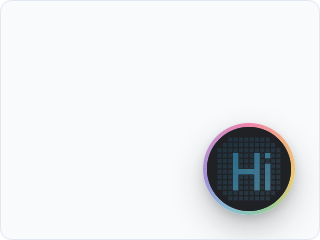
*dotShape: "square" gives square dots, here with a cyan accent.*
### From the portal, without a redeploy
To ship a branded button without hand-writing a spec:
1. Open your Coworker in the portal and go to the **Appearance** tab.
2. Pick a dot shape and an accent; the preview updates live as you change them.
3. **Save**, then copy the look code it gives you.
4. Paste that code into your Provider's `look` prop.
The code is a **live pointer**, not a snapshot. Edit the look in the portal and it updates on your users' next page load, with **no redeploy**. The SDK applies the last resolved look instantly and revalidates fresh in the background, so a saved change propagates on its own.
### Cosmetics only
The look channel is cosmetics-only by construction: the SDK keeps only `dotShape` and `accentColor` from the endpoint's response and discards every other field. No key, provider, or transport can ride this path, the same [closed-loop](/docs/how-it-works) rule that governs the rest of the SDK. If the look ever fails to resolve (offline, a bad code, a blocked request), the button silently falls back to its default and carries on.
---
## Languages
> Offer your coworker in more than English: choose the supported languages + a default, pass the user's language at mint, and let end-users switch in the built-in picker.
Coworkkit is closed-loop, so multi-language is **one setting**, not three. You say which languages a coworker offers, and we drive the whole voice stack (speech recognition, the brand voice, and what the agent says) in the resolved language. There are two levels of control: you choose what a coworker *offers*; each end-user picks theirs per session.
### 1 · Offer languages (the portal)
In your coworker's **Configure** tab, choose the **supported languages** and a **default**. Only languages we have verified for the selected voice are offered, and the default must be one of the supported set. A coworker left with a single language behaves exactly as before; nothing to change.
That is the entire setup. A coworker configured for German now recognizes German, speaks with a German voice, and replies in German.
### 2 · Pass the user's language at mint
If your app already knows a user's language, project it at mint, the one trusted, server-side place you hand us per-user context. Add it to `mintSession`:
```ts
// your token route (server-side)
const session = await mintSession(process.env.COWORKKIT_API_KEY!, {
userId: user.id,
user: { languageCode: user.locale }, // e.g. "de-DE"
});
```
We validate `languageCode` against the coworker's supported set: a supported language is used, anything else falls back to the default. We **never store it**. Your app stays the source of truth for who your user is (see [the closed loop](/docs/how-it-works)).
To let the built-in picker (below) and the browser locale reach your token route, forward the context `getToken` receives, keeping the same error pass-through as the Getting started snippet:
```tsx
getToken={async (ctx) => {
const res = await fetch("/api/session", {
method: "POST",
headers: { "content-type": "application/json" },
body: JSON.stringify({ language: ctx?.language }),
});
if (!res.ok) {
const body = await res.json().catch(() => ({}));
throw Object.assign(new Error(body.error ?? "session mint failed"), {
reason: body.reason,
status: res.status,
});
}
return res.json();
}}
```
On the route, read `language` from the request body and pass it to `mintSession` as `user.languageCode`, as in the snippet above. The Next.js drop-in `coworkkitSessionRoute` mints with the user id only, so a route that forwards a language calls `mintSession` itself.
### 3 · Let end-users switch (the built-in picker)
When a coworker offers more than one language, the button's settings panel shows a language picker. No work for you. A user's choice is remembered in their browser (per app), so a returning user keeps it; we store nothing server-side, and cross-device preference stays your app's job. Switching mid-call restarts the session (language is fixed when the agent starts), and only after the user confirms.
With no explicit choice, a walk-up user's **browser locale** is requested automatically. If it is supported, they get their language on the very first session, with zero integration work.
### Resolution: it never lands on nothing
- the user's pick (the picker, or your mint `languageCode`), if it is supported; otherwise
- the browser locale, if it is supported; otherwise
- the coworker's default.
### Localizing the button's own text
The agent's speech follows the session language automatically, and so does the SDK's own interface text: the button tooltips, the "enable sound" prompt, the caption labels. To pin that text to a specific language regardless of the session, set the `locale` prop:
```tsx
```
### A note on your glossary
Your coworker's persona (the tone, app description, and boundaries you set in its **Configure** tab) carries its spirit into any language: an English-authored persona still shapes a German session. The one exception is the **glossary**. Its say-X-not-Y pairs are literal words, so author them in the language your users will speak; cross-language, they apply best-effort.
---
## The Watch panel
> See what the agent sees and did (live turns, the action timeline, latency): an in-app devtool you drop in during a build.
`CoworkkitWatch` is a drop-in developer panel you mount during a build to **see what the agent perceives and did**. It reads the same internal session state the on-screen button does (no new wire, no instrumentation on your side) and renders it as a floating, resizable panel over your app. Because it reads the Provider's context, mount it anywhere inside `CoworkkitProvider`; where it sits in the tree doesn't matter.
It's the fastest way to answer the two questions every integration raises: does the agent actually see the surfaces and elements I declared, and did my actions fire, and gate, the way I intended?
### Drop it in
It ships as a deep import so it stays tree-shakeable: the panel and its code never reach a bundle that doesn't import it. Add one line to the Provider you already have:
**`app/providers.tsx`**
```tsx
"use client";
import { CoworkkitProvider } from "@coworkkit/react";
import { CoworkkitWatch } from "@coworkkit/react/watch";
export function Providers({ children }: { children: React.ReactNode }) {
return (
{
const res = await fetch("/api/session", { method: "POST" });
if (!res.ok) {
// Check before parsing, and guard the parse: an error page (a proxy 404,
// a framework 500) is often HTML, and a throw here would lose both fields.
const body = await res.json().catch(() => ({}));
// Pass the reason AND the status through. That is what lets the button say
// "Setup needed" for a bad key instead of a generic "Can't connect":
throw Object.assign(new Error(body.error ?? "session mint failed"), {
reason: body.reason,
status: res.status,
});
}
return res.json();
}}
>
{children}
{/* Mounts only in development; ships nothing to a production build. */}
);
}
```
Watch renders only in development, and it doesn't open on its own; it's a panel you toggle. Open it from the watch icon in the on-screen button's control row, or press `ctrl+shift+k`. If you've mounted it and don't see the watch icon, you're almost certainly on a production build, where Watch hides itself by default. That's expected, not a missing feature; **It's a dev surface** (below) shows how to force it on when you need it.
### What it shows
A pinned **State strip** across the top (session phase, mic, Hand-mode arm state, the active surface, session duration and idle time), plus four tabs:
- **Timeline**: the live event stream, turn by turn. Each action call, how it was gated (allowed, Hand-blocked, or held for a [confirmation](/docs/control)), and its outcome. This is where you watch an action actually fire, or catch the `needs_hand_mode` that explains why it didn't.
- **Catalogue**: the live declared-exposure snapshot. The current surface, every mounted element (including see-only ones), and the full action catalogue with each entry's `kind` and `control`. This is what [proves the agent sees](/docs/actions-surfaces) what you declared. It also marks the declared-vs-live distinction, so a snapshot taken before the agent joins isn't mistaken for "the agent already knows".
- **Transcript**: the conversation, both sides, as the agent heard and spoke it.
- **Metrics**: per-turn latency, a turn table, and a session summary, for spotting a slow leg without reaching for a profiler.
### It's a dev surface
Watch is gated to `NODE_ENV === "development"` by default. In a production build it mounts nothing, so leaving `` in your tree is safe. Two escapes exist for when you need it past dev: `enableInProduction` for a QA build, and `visibleTo`, a predicate over your own auth that must return `true` before anything renders (pair it with the `redact` policy to mask transcripts and tool I/O).
The header's copy and download buttons emit the whole session (state, timeline, transcript, metrics) as a single JSON blob. That's how you hand a teammate the exact observable state you're looking at: send them the export instead of narrating what you saw.
---
## Advanced
> Multiple surfaces, the session lifecycle, minutes and metering, and testing your integration, once the basics are wired.
Once the token route and Provider are wired and the agent can act, four things are worth knowing. None of them are extra setup. They're behaviours the runtime already has, and the shape of a larger integration.
### Multiple surfaces
Declare a `useSurface` on each route, next to the state that route already owns, not one global surface for the whole app. It's active only while its component is mounted, so as the user navigates the active surface swaps automatically and the agent always knows where they are and what's on screen:
```tsx
// app/tasks/page.tsx
useSurface({ label: "Tasks board", data: { remaining } });
// app/settings/page.tsx
useSurface({ label: "Settings", data: { plan } });
```
You name only the human `label`; the SDK derives a stable internal id from it, so there's nothing to keep unique across routes. Hang each route's [elements and actions](/docs/actions-surfaces) off the same component and they come and go with the surface. What should live on a route and what should live in a persistent layout is the first question on [Patterns](/docs/patterns).
### Session lifecycle
A voice session winds down on its own when no one's interacting, so an abandoned tab doesn't burn minutes: after about **45 seconds** of no interaction it goes idle, and if nothing happens for roughly **120 seconds** more, the session ends. This is automatic and not yours to manage; click the button again to start a fresh session. Don't build keep-alive logic around it. (Those are the defaults; the exact thresholds are set on our side, not a prop you configure.)
### Minutes & metering
Voice is metered by the **minute of live session**, per coworker, against a prepaid balance you manage in the portal under Settings → Plan & Billing. You meter nothing in your own code, and there is no per-request accounting to reconcile: idle time past the cut above isn't billed because the session is already over.
- **Running low:** the account owner gets a low-balance email, and the portal shows a banner on the dashboard. Sessions keep starting.
- **At zero:** new sessions are refused at the token route. Your `getToken` receives an `out_of_credit` reason and the button's ring says *Out of credit* to the user ([every ring status](/docs/troubleshooting)). A session that is already running when the balance reaches zero is ended by the runtime at that point. Nothing in your app breaks; the button simply won't connect until the balance is topped up, which takes effect immediately.
- **Concurrency:** each coworker has a concurrent-session limit; past it the ring says *Line busy* until a session ends.
If you want your own copy in front of the user instead of the ring's, branch on the `reason` your route relays. The [Backends](/docs/backends) page lists every value.
### Testing your integration
`useAction`, `useSurface`, and `useElement` are ordinary React hooks, and the handlers you pass them are ordinary functions. Unit-test those handlers directly, with no agent in the loop. The hooks themselves no-op without a Provider, so a hook test only needs to assert what your app does, not the wire. To confirm the agent actually perceives your annotations end to end, use the [Watch panel](/docs/watch); its Catalogue tab is the ground truth for what's exposed.
---
## Configuration
> Every CoworkkitProvider prop and its default: button position and drag, the z-index escape valve, the confirmation timeout, the app-wide control baseline, locale, and the wiring props.
`CoworkkitProvider` is the one component you mount. Only `getToken` is required; it is your [closed-loop token route](/docs/how-it-works). Every other prop is optional and ships with a sensible default, so a bare Provider works out of the box. This page is the complete list.
```tsx
{children}
```
### Placement & behavior
Where the button sits and how it moves.
```tsx
fabPosition?: "bottom-right" | "bottom-left" | "top-right" | "top-left"; // default "bottom-right"
draggable?: boolean; // default true
zIndex?: number; // default 2147483640
```
- `fabPosition`: which corner the button anchors to. Default `"bottom-right"`.
- `draggable`: let the user drag the button off its anchor; the new position persists across reloads. Default `true`. Set `false` to pin it.
- `zIndex`: the stacking order of the button, its ring, and the page-edge glow. The default, `2147483640`, sits just under the 32-bit maximum so the overlays float above almost everything. Lower it only if the button covers an overlay of your own that legitimately needs to sit on top.
### Confirmation & control
How actions are gated. Both are covered in depth under [Control & confirmation](/docs/control); here are the two Provider-level knobs.
```tsx
confirmationTimeout?: number; // default 60 (seconds)
defaultControl?: "open" | "soft" | "hard"; // default "open"
```
- `confirmationTimeout`: how many seconds a `hard` confirmation may stay pending before the SDK resolves it as `timeout` (the handler never runs). Default `60`.
- `defaultControl`: the app-wide baseline for actions that declare no `control` of their own and aren't caught by the destructive-name fail-safe. Default `"open"` (reads and benign actions run freely). Set `"soft"` to make the whole app ask-first; an explicit per-action `control` always wins.
### Appearance & language
```tsx
look?: string | LookSpec; // brand the button (a look code from the Appearance tab, or an inline spec)
intensity?: "default" | "subtle" | "off"; // default "default"
locale?: string; // default: follows the session language
```
- `look`: brand the button with your accent and dot style, via a look code from your Coworker's Appearance tab or an inline spec. See [Appearance](/docs/appearance).
- `intensity`: the visual prominence of the button. Default `"default"`. `"subtle"` dials it down (a fainter ring and a softer shadow); `"off"` removes the button entirely, an escape hatch to keep the Provider mounted without rendering the surface.
- `locale`: pins the language of the SDK's own interface text (tooltips, the "enable sound" prompt, caption labels, the Confirm / Cancel buttons) to a BCP-47 tag such as `"de-DE"`. When omitted, that text follows the language the session resolved to, so a German session already gets a German "Confirm". This never changes what the agent *speaks*; that is resolved server-side. See [Languages](/docs/languages).
### Wiring
Rarely set; the defaults are right for the common case.
```tsx
getToken: (context?: GetTokenContext) => Promise; // required: your token route
cloudUrl?: string; // fallback control base
fallbackSurface?: (pathname: string) => Surface; // derive a surface from the URL
onActionRecord?: (record: ActionRecord) => void; // observe every settled action
```
- `getToken`: the one required prop. An async function that returns a minted session (`{ token, serverUrl, cloudUrl }`) from your server, unchanged. The tenant key stays server-side; it never reaches the browser. It receives an optional `context` whose `language` is the language the user picked in the button (or their browser locale); forward it to your route to honour it, see [Languages](/docs/languages). The wiring itself is in [Getting started](/docs/getting-started).
- `cloudUrl`: normally omitted. A live session already carries the control base it was minted against, and that value wins while a session is running; this prop is only the fallback for pre-session and session-less (dev) configs.
- `fallbackSurface`: derive a [surface](/docs/actions-surfaces) from the current pathname when a route declares no `useSurface` of its own.
- `onActionRecord`: called once per settled action with a record of what ran, how it was gated, and the outcome. The SDK emits; you persist it (your DB or SIEM). The [Watch panel](/docs/watch) shows the same record in dev with no wiring.
Note there is **no** `apiKey` prop. The tenant key is secret and server-side, held by your `getToken` route. Putting it in the browser is exactly what the [closed-loop model](/docs/how-it-works) exists to prevent.
---
## Browser & framework support
> Which browsers work (Chromium, Safari, Firefox), the mic + WebRTC requirement, the mobile story, and the React / Next.js versions the SDK supports.
Coworkkit runs in the browser (the button, the microphone, the WebRTC voice connection) with a thin React SDK on top. So "will it work in my app?" comes down to two things: a browser modern enough for WebRTC, and a React app to mount the Provider in. Here's exactly what's supported today, and where the edges are.
### Browsers
Any modern browser with WebRTC and microphone access. There's no plugin or extension to install; it's the standard web platform:
- **Chromium**: Chrome, Edge, Arc, Brave
- **Safari**
- **Firefox**
The one hard requirement is a **secure context** for the microphone: browsers only grant `getUserMedia` on `https://` or `localhost`, never on a plain `http://` LAN IP. Serve over HTTPS in production and the mic prompt appears the first time a user starts a session.
### Mobile & iOS
**Desktop first.** Mobile browsers (iOS Safari, Android Chrome) do have WebRTC and a microphone, so a session can connect. But the button and its controls are tuned for a desktop pointer, and mobile is **not a tested target yet**. Treat phone and tablet as best-effort rather than supported until we say otherwise.
### Frameworks
The SDK is a **React** package. It needs **React 18 or newer** (18 and 19 are both supported). **Next.js App Router** gets the one-line token route drop-in (this very portal runs on Next.js 16 and React 19), and the Quickstart also ships ready-made variants for a **Vite SPA + Express** and for **Remix**. Any other React setup works the same way: the Provider is just a component, and the token route is one `mintSession` call in whichever backend you have ([Backends](/docs/backends)). Server-rendered or single-page, URL-routed or state-driven, it's all just your React tree. The agent knows which view the user is on from `useSurface({ label })`, a human label you pass, never the URL ([how it works](/docs/how-it-works)), so an SSR app and a client-only SPA are equally first-class.
There is **no script-tag or CDN embed** today: no `